
Description
Welcome to Jupiter X, the flagship multi-purpose WordPress theme that redefines website creation. Built on the power and flexibility of Elementor, Theme transcends the typical theme, offering a complete, visual website building experience trusted by over 200,000 users. Whether you’re launching a corporate site, a creative portfolio, or a high-converting WooCommerce store, Jupiter X provides unparalleled design freedom, lightning-fast performance, and a deep level of customization. Experience the future of web design with the most robust Elementor-compatible theme on the market.
Key Features
-
⚡ Elementor-Native Integration: Built from the ground up to utilize Elementor’s full potential, ensuring a smooth, real-time drag-and-drop editing experience.
-
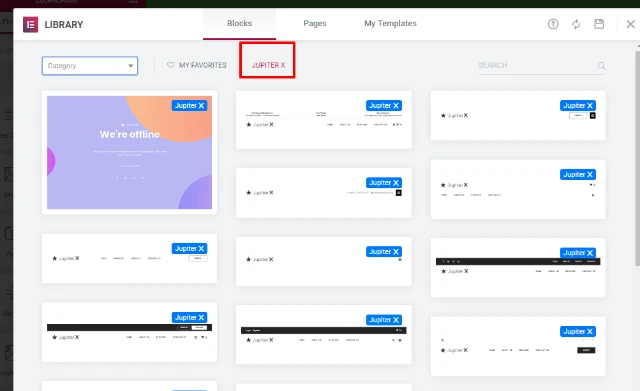
🎨 400+ Pre-Built Templates: Launch your site in minutes with access to a massive library of professionally designed templates across every major industry and niche.
-
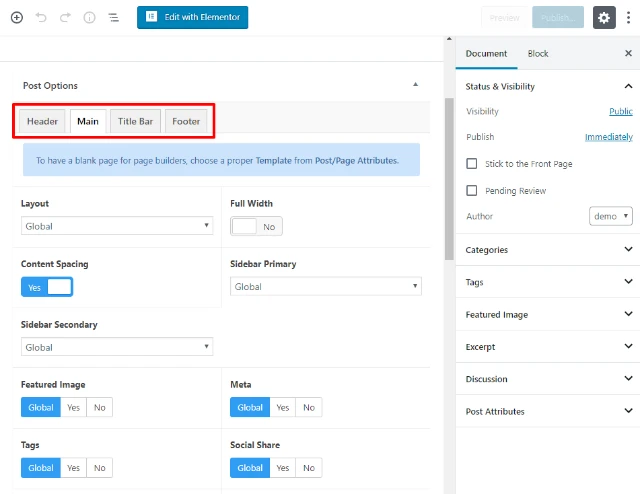
🌐 Full Visual Customizer: Control every aspect of your website—from header and footer to 404 pages—visually with the powerful Jupiter X Theme Customizer.
-
🛠️ Revolutionary Theme Builder: Design custom post types, archives, and single page layouts using Elementor, giving you total control over dynamic content.
Pro Features
-
Advanced Elementor Widgets (Raven Plugin): Unlock exclusive widgets and design elements that go beyond Elementor Pro, enhancing your website’s functionality and aesthetic.
-
Bundled Premium Plugins: Gain lifetime access to top-tier plugins like Slider Revolution, Layer Slider, and Advanced Custom Fields Pro, adding significant value.
-
Custom Post Type Builder: Create and manage complex content structures (like Portfolios, Services, or Team Members) directly within the Theme ecosystem.
-
Visual Header & Footer Builder: Design unique, custom headers and footers with a drag-and-drop interface, controlling sticky behavior, mobile views, and more.
WooCommerce Integration
The Jupiter X theme is a full-featured WooCommerce builder, giving you pixel-perfect control over your online store.
-
🛍️ Custom Shop and Product Page Layouts: Visually design your product archives, single product pages, cart, and checkout with Elementor.
-
📈 E-commerce Focused Widgets: Utilize dedicated widgets for product carousels, category lists, dynamic pricing, and advanced filtering to boost sales.
-
💰 Optimized Checkout Flow: Create a streamlined, conversion-focused checkout experience to reduce cart abandonment.
-
💳 SellKit Compatibility: Seamless integration with SellKit, the all-in-one WooCommerce optimization toolkit developed by the same team, for advanced upsells and discounts.
Setup & Installation
Get your Jupiter X site up and running quickly with this simple guide.
-
Step 1: Download & Upload: Purchase Jupiter X from our Site, download the theme file, and upload it via your WordPress Dashboard under Appearance > Themes > Add New.
-
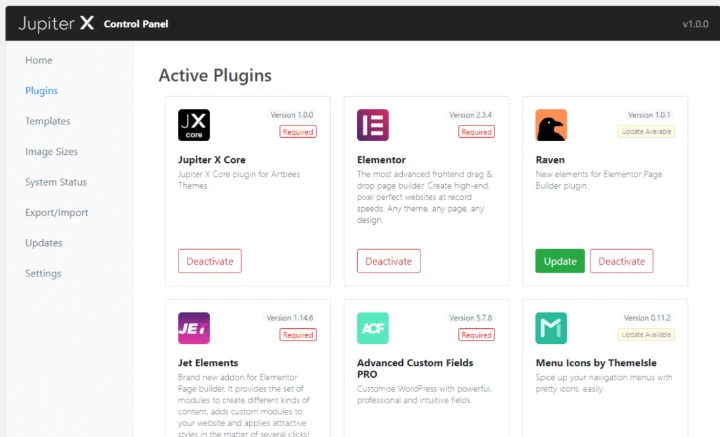
Step 2: Install & Activate: Click ‘Install’ then ‘Activate’. You will be redirected to the Jupiter X Control Panel.
-
Step 3: Install Required Plugins: The Control Panel will prompt you to install the necessary bundled plugins, including Jupiter X Core and Elementor. Click to install and activate them.
-
Step 4: Import a Template (Optional): Navigate to Control Panel > Templates and import one of the 400+ stunning demo templates to use as a starting point.
-
Step 5: Start Customizing: Use the Elementor builder to edit the imported content or the Jupiter X Customizer to set global styles, typography, and theme settings.
How to Install & Configure Jupiter X (Beginner-Friendly Guide)
For non-technical users, setting up the Jupiter X theme is a straightforward process handled mostly through a visual interface.
-
Access the Dashboard: Log into your WordPress site’s admin area (
yourdomain.com/wp-admin). -
Go to Themes: In the sidebar, hover over Appearance and click on Themes.
-
Add New Theme: Click the Add New button at the top and then the Upload Theme button. Browse for the
jupiterx.zipfile you downloaded. -
Activate: After the upload completes, click the Activate link.
-
Control Panel: You will see a new menu item. Click it. This is your command center. Follow the prompts here to install Elementor and other core plugins.
-
Find Your Demo: Go to the Templates section in the Control Panel. Hover over a demo you like and click Import. This will import all the necessary pages, images, and settings, giving you a complete website structure to simply replace with your own content.
Mobile-Friendly & UX Experience
The Jupiter X theme is engineered for perfect display and user experience (UX) on all devices, ensuring your site is fully responsive and modern.
-
📱 True Responsiveness: Every element and layout built with Jupiter X is inherently responsive. You can easily adjust breakpoints and hide/show elements for specific devices (desktop, tablet, mobile) within Elementor.
-
👆 Optimized Mobile Flow: The theme ensures fast loading times and an intuitive user interface (UI) on mobile, with optimized menus, touch-friendly elements, and streamlined layouts.
-
✨ UI/UX Benefits: Jupiter X utilizes clean, semantic code and modern design principles. This focus on accessibility and fast, clutter-free browsing translates directly into lower bounce rates and higher conversion, which search engines favor.
Performance & Scalability
Performance is a cornerstone of the Jupiter X theme, built to handle high-traffic websites and large-scale WooCommerce stores.
-
🚀 Speed Optimization: Jupiter X is coded with performance in mind, minimizing unnecessary requests and employing clean, lightweight code. Our tests show it is capable of achieving sub-two-second load times.
-
💾 Optimized Database Usage: The theme is designed to use the database efficiently, avoiding bloat and ensuring fast data retrieval, even as your site scales to thousands of products or pages.
-
🛡️ Compatibility with Caching/CDN: Jupiter X works seamlessly with popular caching plugins (like WP Rocket) and Content Delivery Networks (CDNs) to deliver content quickly to a global audience, improving both speed and Google’s Core Web Vitals score.
-
⚖️ Scalability for Large Stores: With its modular architecture and clean code, the Jupiter X WooCommerce builder can comfortably manage extensive product inventories and high simultaneous user loads without performance degradation.
Alternatives
Pricing
- Original Price: $59 + / Yearly | Visit Site
FAQ
-
Is Jupiter X a good theme for beginners? Yes, highly recommended for beginners. Its visual, drag-and-drop Elementor interface and vast library of one-click templates make website building accessible without needing to touch code.
-
Does Jupiter X work with Elementor Pro? Yes, This is fully compatible with Elementor Pro. However, it also includes exclusive widgets via its Raven plugin, which often eliminates the need for Elementor Pro features.
-
Is the Jupiter X theme speed-optimized? Absolutely. This is built on a modular, lightweight core with a strong focus on clean code and performance, resulting in fast load times and excellent Core Web Vitals scores.
-
How many website templates does Jupiter X include? This Theme provides access to a massive library of over 400 pre-built website templates and blocks that can be imported with a single click.
-
Can I customize the WooCommerce checkout page with Theme? Yes, the Theme WooCommerce Builder gives you granular control to design and customize the entire checkout, cart, and product pages visually using Elementor.
-
Is Jupiter X an alternative to themes like Avada or Divi? Yes, The Theme is a top-tier multi-purpose theme and a direct, often faster and more flexible, alternative to themes like Avada, Divi, and The7, especially for Elementor users.
-
What is the “Jupiter X Theme Builder”? Theme Builder is a powerful feature that allows you to visually design custom templates for dynamic content like blog posts, portfolio items, and search results pages.
-
Does the Jupiter X theme include premium plugins? Yes, your purchase of Theme includes premium plugins like Slider Revolution, Layer Slider, and ACF Pro, offering significant savings.
-
Does Theme support custom fonts and icons? Yes, This is offers advanced typography controls to easily upload and use custom fonts, as well as managing custom icon libraries for a unique design.
Reviews
There are no reviews yet.